NucleoOS-P4
An operating system for a seven-inch ESP32-P4 touchscreen: two desktops, a Store with over 400 apps, an assistant that works offline.
- Kind
- System
- Status
- In development
- SoC
- ESP32-P4 + C6
- Display
- 7" 1024×600
- Stack
- C++23 · LVGL 9
- Apps
- Native · WASM · Lua
- Store
- Over 400 signed apps
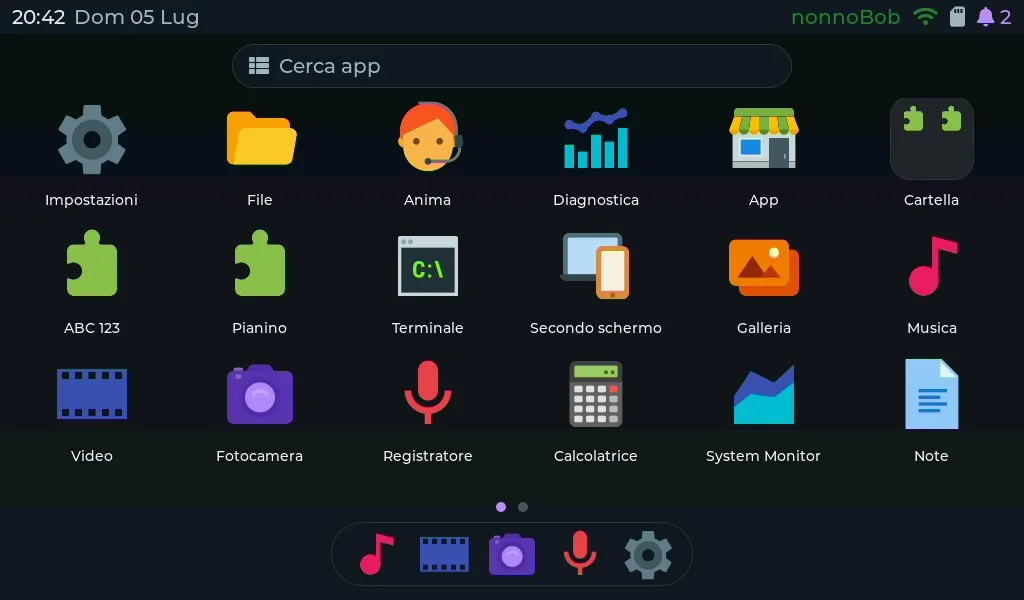
Same family as NucleoOS, hardware from another bracket: a seven-inch Guition panel, 1024×600 with capacitive touch, driven by an ESP32-P4 alongside an ESP32-C6 acting as co-processor for Wi-Fi 6 and BLE. The P4 has two RISC-V cores at 360 MHz and 32 MB of external RAM.
No Linux and no Android. Underneath are ESP-IDF and LVGL; everything else is written for this board. The goal was a small computer to use, not a demo that boots once for the video.
Two desktops
The first is a tablet launcher: an adaptive grid with pages, folders, a dock, search and wallpapers, in landscape and portrait, with five-finger multitouch. System gestures live only on the screen edges, so the middle stays with the apps.
The second is a classic desktop: icons, a taskbar, a Start menu with search, windows with title bars, right-click menus. It switches on by itself when a mouse and a keyboard are plugged in, USB or Bluetooth. Focus moves with Tab, Esc goes back, Alt+Tab and Alt+F4 work. Only the shell changes: the apps are the same.
ANIMA, the assistant
ANIMA answers on the device when it can and calls a language model only when it has to. With no network it does calculations (with follow-ups too: “6 times 6”, then “plus 5”), tells the time and date, converts units, sets timers and reminders, takes notes, opens apps, and translates with offline dictionaries. The offline voice can read the answers out.
When it needs a model, it finds Ollama, LM Studio or llama.cpp on the home PC by itself, or uses a cloud API. If a model does not answer it moves to the next, and if none answers the device’s own answer is still there. API keys are sealed to the chip and never leave it.
With a model connected it sees photos, writes and runs Lua and Python code on the board, and reads the screen as a list of controls: it taps, types, and checks the result after each step. It can also be reached from Telegram and, through an MCP server, from Claude Code or Cursor. When it doesn’t know, it says “I don’t know”.
The Store
Over 400 apps and games, installed over Wi-Fi in a few seconds. Every package is signed: the board checks each file against the Store’s key and refuses anything that doesn’t match. Before installing it shows the permissions (Internet, files, camera, microphone, home devices), and an update that asks for more highlights them.
Native apps are compiled into the firmware. Store apps are not: they are WebAssembly and run in a WAMR runtime with a declared ABI. The difference is not academic. Adding a game to a monolithic firmware means recompiling and reflashing, and holding two copies of everything during the update, and memory is exactly what these chips lack. With WASM the app just installs. On top of that the code is compiled ahead of time to native RISC-V instructions, so a game doesn’t pay for an interpreter.
The catalog is a static site on GitHub Pages: it can be browsed from a browser too.
Reading and working
Books is an ebook reader: EPUB, FB2, CBZ comics, text and Markdown. It hyphenates in eleven languages, has six themes (including an e-ink simulation with its refresh flash) and a catalog of public-domain books from Project Gutenberg, Standard Ebooks, Wikisource and Wikibooks, downloaded with one tap. Hold the board upright and the page turns with it.
Library reads offline Wikipedia and any Kiwix ZIM file, pictures and formulas included.
Sheets is a native spreadsheet that opens and saves Excel files (xlsx), and opens xls, ods and csv. Function names follow the interface language, and ANIMA can propose edits that you apply with one tap. For writing there is WordGrinder, which saves odt, Markdown and HTML. With a keyboard and the classic desktop the board becomes a small writing and accounting machine.
Games
Vertice is a 3D engine inside the firmware: it splits the screen into tiles and draws them on both cores, with lights, fog, particles and a Mode-7-style floor. Vertice GP, a kart race, runs on it, along with Vertice Bass and Tank Rally.
The Store has Chocolate Doom with Freedoom and OPL music, ScummVM 2.9.1 with eight freeware adventures, a Game Boy emulator with free homebrew games, 83 Arduboy games, 83 CHIP-8 games, the 149 games of the WASM-4 fantasy console, 33 interactive fiction titles (Zork included) and LÖVE games on Lua. You play with the on-screen gamepad, a keyboard or a gamepad.
Media and connections
JPEG decoding is hardware and scaling goes through the PPA, the chip’s 2D engine, so the gallery scrolls instead of struggling. The video player does MJPEG and MPEG-1. Music covers MP3, FLAC, AAC and WAV, plays in the background and can hot-plug out to USB audio. The camera has automatic exposure and white balance, takes photos and records MJPEG video.
The board works as a second screen for Windows, Mac, Linux and Android, as the dot-matrix display of a virtual pinball cabinet (tested on a real cabinet) and as a Home Assistant panel, to which it also announces its own sensors.
There is also a web companion: over Wi-Fi the board serves a browser desktop with about forty windowed applications (files, a spreadsheet, an SSH client, mail, internet radio, a DJ mixer) that work on the board’s own files and hardware. For command-line programs there is the Terminal, with a shell, Lua, MicroPython, JavaScript and SQLite.
Languages and updates
The interface is in five languages (Italian, English, Spanish, French, German) with live switching. Offline speech synthesis speaks Italian and English.
Updates arrive over Wi-Fi and are signed. If one goes wrong there is a recovery app, a safe mode and a copy of the last good version in flash. On every commit CI checks the memory budgets, and fuzzers exercise every parser that reads data from outside.
It installs from the browser, Chrome or Edge, with no toolchain.
Free for noncommercial use; commercial use requires a licence.
Written about this project
-
5 min read
Four hundred apps, one at a time
NucleoOS-P4 has a Store with over 400 apps and an assistant, on a microcontroller. I chose the features. Memory decided the shape.
-
3 min read
A computer sold as a component
The most powerful chip in the ESP32 family has no wifi: a second chip sits next to it. The family born as a radio module took the radio out.